
Stilopad ਲੈਣ ਲਈ ਸੌਖੀ ਗਾਈਡ
ਆਪਣੇ device ਉੱਤੇ Stilopad ਕਿਵੇਂ ਲਵੋ
Android ਲਈ Google Play ਚੁਣੋ, browser ਵਿੱਚ Web Lite ਅਜ਼ਮਾਓ ਜਾਂ iOS availability waitlist ਵਿੱਚ ਨਾਮ ਦਿਓ।
ਆਪਣੇ device ਮੁਤਾਬਕ ਚੋਣ ਕਰੋ। Android Google Play ਤੋਂ install ਹੁੰਦਾ ਹੈ। Web Lite browser ਵਿੱਚ ਖੁੱਲ੍ਹਦਾ ਹੈ। Download page ਉੱਤੇ Android testing link ਅਤੇ iOS waitlist ਹੈ; waitlist App Store download ਨਹੀਂ ਹੈ।
Android ਲਈ Stilopad ਲਵੋ
ਆਪਣੇ device ਲਈ ਰਾਹ ਚੁਣੋ
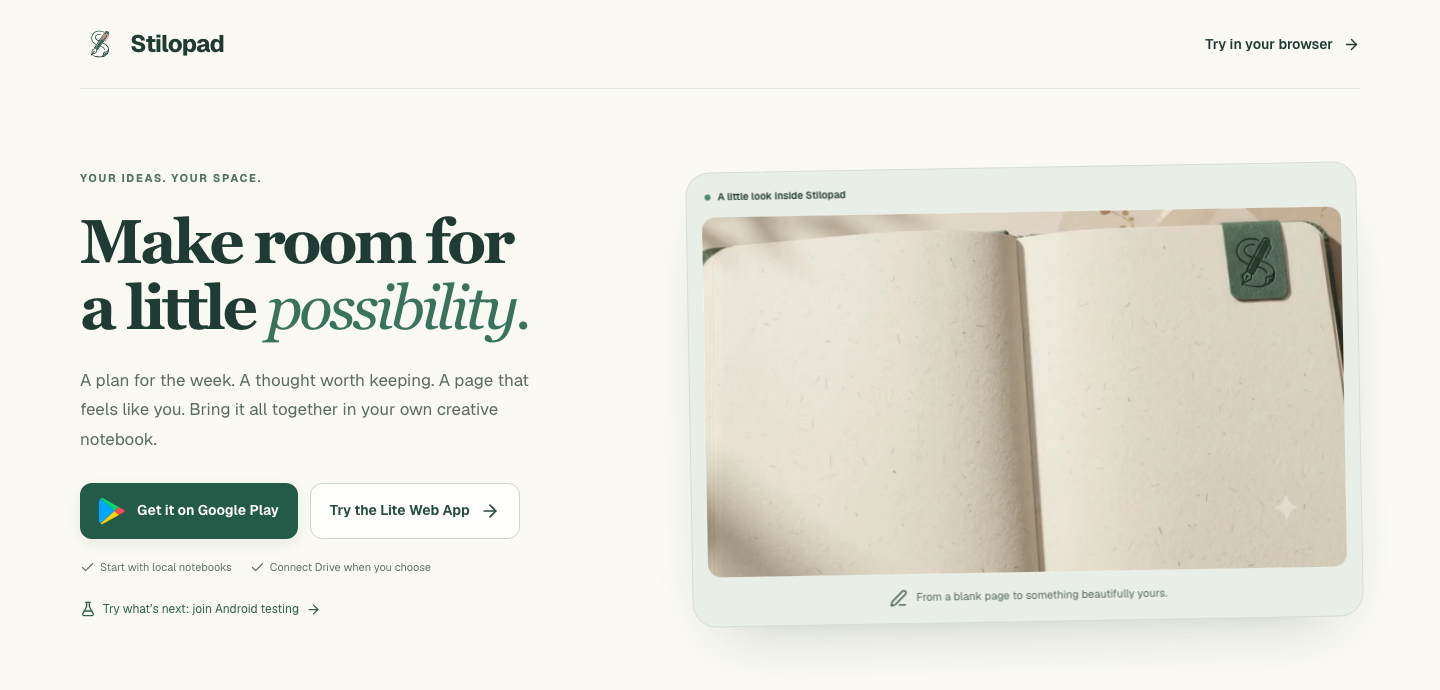
ਕਦਮ 1, ਕੁੱਲ 4 ਵਿੱਚੋਂ — Download page ਖੋਲ੍ਹੋ
Screenshots ਮੌਜੂਦਾ `/download` page ਦੇ local built preview ਤੋਂ crop ਕੀਤੇ ਹਨ; ਇਸ ਦੇ source ਵਿੱਚ public Google Play link, Android testing link, Web Lite ਰਾਹ ਅਤੇ App Store waitlist ਦਿੱਤੇ ਹਨ। Production site ਨਹੀਂ ਬਦਲੀ ਗਈ। ਕੋਈ store install, Android test enrollment, iOS waitlist submission, app update ਜਾਂ device compatibility ਜਾਂਚ ਨਹੀਂ ਹੋਈ।
Android ਲਈ Stilopad ਲਵੋ
Android ਲਈ Stilopad ਲਵੋ
Download page ਖੋਲ੍ਹੋ
stilopad.com/download ਖੋਲ੍ਹੋ। ਇਸ page ਉੱਤੇ Android ਲਈ Google Play ਅਤੇ Lite Web App ਦਾ ਰਾਹ ਹੈ। ਆਪਣੇ device ਲਈ ਠੀਕ ਚੋਣ ਕਰੋ; ਅਣਜਾਣ site ਤੋਂ Android package ਨਾ ਲਵੋ।
Android ਜਾਂ Web Lite ਚੁਣੋ
Android app Google Play ਤੋਂ ਮਿਲਦੀ ਹੈ। Web Lite browser ਵਿੱਚ ਖੁੱਲ੍ਹਦਾ ਹੈ ਅਤੇ iPhone/iPad ਲਈ ਮੌਜੂਦਾ ਰਾਹ ਹੈ। Browser ਵਿੱਚ ਕੁਝ features Android app ਤੋਂ ਵੱਖਰੇ ਹੋ ਸਕਦੇ ਹਨ।
ਚਾਹੋ ਤਾਂ Android testing ਵਿੱਚ ਸ਼ਾਮਲ ਹੋਵੋ
Testing card Google Play ਦੇ test ਨਾਲ ਜੁੜਦਾ ਹੈ। Sign in ਕਰੋ, test join ਕਰੋ ਅਤੇ ਜੇ ਤੁਹਾਡੇ account ਲਈ ਉਪਲਬਧ ਹੋਵੇ ਤਾਂ Play ਤੋਂ install ਕਰੋ। Test access, ਸਭ ਲਈ ਜਾਰੀ public version ਦੇ ਬਰਾਬਰ ਨਹੀਂ।
iPhone ਅਤੇ iPad ਦੀ ਉਪਲਬਧਤਾ
ਹੁਣ browser ਰਾਹੀਂ Web Lite ਵਰਤੋ। App Store ਵਾਲਾ ਹਿੱਸਾ waitlist form ਹੈ; ਇਸ ਨੂੰ ਭੇਜਣ ਨਾਲ iOS app install ਨਹੀਂ ਹੁੰਦੀ ਅਤੇ ਜਾਰੀ ਹੋਣ ਦੀ ਤਾਰੀਖ਼ ਪੱਕੀ ਨਹੀਂ ਹੁੰਦੀ।
ਮੌਜੂਦਾ download page public Google Play listing ਅਤੇ Android testing ਲਈ ਵੱਖਰਾ link ਦਿੰਦਾ ਹੈ। Test access Play ਉੱਤੇ ਉਪਲਬਧਤਾ ਉੱਤੇ ਨਿਰਭਰ ਕਰਦਾ ਹੈ ਅਤੇ Google account ਨਾਲ test ਵਿੱਚ ਸ਼ਾਮਲ ਹੋਣਾ ਪੈਂਦਾ ਹੈ।
Web Lite ਅਤੇ iPhone/iPad ਉੱਤੇ
Web Lite ਅਤੇ iPhone/iPad ਉੱਤੇ
Browser ਵਿੱਚ Stilopad ਵਰਤਣ ਲਈ stilopad.com/download ਖੋਲ੍ਹੋ ਅਤੇ “Try the Lite Web App” ਚੁਣੋ; Android app install ਕਰਨ ਦੀ ਲੋੜ ਨਹੀਂ।
Android ਲਈ “Get it on Google Play” ਵਰਤੋ। Android testing link ਵੱਖਰਾ ਅਤੇ ਚੋਣਵਾਂ ਹੈ; ਜੇ access ਮਿਲੇ ਤਾਂ sign in ਕਰਕੇ test join ਕਰੋ, ਫਿਰ Play ਤੋਂ install ਕਰੋ।
iPhone ਜਾਂ iPad ਉੱਤੇ Web Lite ਵਰਤੋ। App Store section waitlist ਹੈ, iOS app download ਨਹੀਂ। ਇਸ ਗਾਈਡ ਵਿੱਚ app install ਜਾਂ update ਨਹੀਂ ਕੀਤੀ ਗਈ।
ਅਧਿਕਾਰਤ ਰਸਤਾ ਵਰਤੋ
Google Play ਤੋਂ install ਕਰਨ ਨਾਲ Android updates Play Store ਰਾਹੀਂ ਮਿਲਦੇ ਹਨ। Web Lite ਲਈ Android install ਦੀ ਲੋੜ ਨਹੀਂ। ਅਣਜਾਣ site ਤੋਂ unofficial APK ਨਾ ਲਵੋ ਅਤੇ device ਬਦਲਣ ਤੋਂ ਪਹਿਲਾਂ ਨੋਟਬੁੱਕ ਦੀ backup copy ਬਣਾਓ।
Update ਤੋਂ ਬਾਅਦ version ਵੇਖੋ
Google Play ਤੋਂ update ਮਗਰੋਂ Stilopad ਮੁੜ ਖੋਲ੍ਹੋ ਅਤੇ installed build ਦੀ ਪੁਸ਼ਟੀ ਲਈ ਲੋੜ ਪਏ ਤਾਂ Settings ਵਿੱਚ About/version ਵੇਖੋ। Store page, test invitation ਜਾਂ waitlist form ਇਹ ਸਾਬਤ ਨਹੀਂ ਕਰਦੇ ਕਿ device ਚੱਲੇਗਾ ਜਾਂ update install ਹੋਈ।
ਜੇ install ਦੀ ਚੋਣ ਨਾ ਦਿੱਸੇ
- Play Store ਦੀ ਉਪਲਬਧਤਾ ਦੇਸ਼, device compatibility, account ਅਤੇ test access ਮੁਤਾਬਕ ਬਦਲ ਸਕਦੀ ਹੈ। Google Play ਦਾ ਦਿਖਾਇਆ ਸੁਨੇਹਾ ਮੰਨੋ।
- iPhone ਜਾਂ iPad ਉੱਤੇ ਹੋ ਤਾਂ browser ਵਿੱਚ Web Lite ਖੋਲ੍ਹੋ; App Store link ਇਸ ਵੇਲੇ waitlist ਹੈ, install ਨਹੀਂ।
- Update ਦੀ ਸਮੱਸਿਆ ਵੇਖਣ ਤੋਂ ਪਹਿਲਾਂ app uninstall ਨਾ ਕਰੋ; ਪਹਿਲਾਂ ਪੁਸ਼ਟੀ ਕਰੋ ਕਿ ਨੋਟਬੁੱਕਾਂ ਦੀ backup ਹੈ। ਇਸ ਗਾਈਡ ਵਿੱਚ install, billing, compatibility ਜਾਂ update transaction ਨਹੀਂ ਜਾਂਚਿਆ ਗਿਆ।